
Integrate Heap with Optimizely Web Experimentation
TL;DR
Heap is a product analytics platform built around autocapture — it records every user interaction on your site by default, without requiring manual event instrumentation. Integrating Heap with Optimizely Web Experimentation attaches experiment decision data to every event Heap captures, enabling you to segment funnels, retention curves, and user journeys by variation without writing additional tracking code.
This guide covers two integration methods. The first is Heap's built-in autocapture integration, where Heap reads Optimizely's state object automatically and appends experiment properties to captured events — no code required. The second is a custom JSON integration using Optimizely's track_layer_decision callback, which gives you full control over property naming, user profile data, and event structure. It also covers Heap Connect, Heap's data warehouse export feature for teams that want to run advanced experiment analysis in SQL.
How the Integration Works
When Optimizely buckets a visitor into an experiment or personalization campaign, it fires a decision callback. The custom integration captures this callback and sends data to Heap in two forms: event properties set via heap.addEventProperties() — Heap's mechanism for attaching session-level context to every subsequent captured event — and a discrete "Experiment Viewed" event with campaign metadata. Heap then associates the experiment context with every interaction the user performs after being bucketed.
flowchart LR
    A[Visitor lands on page] --> B[Optimizely makes bucketing decision]
    B --> C[Decision callback fires]
    C --> D["heap.addEventProperties() sets super properties"]
    C --> E["heap.track('Experiment Viewed')"]
    D --> F[Properties attach to all future Heap events]
    E --> G[Heap Event Stream]
    F --> H[Heap Dashboard]
    G --> H
    H --> I[Segment Funnels and Retention by variation]
addEventProperties() is Heap's equivalent of Mixpanel's register() — properties set with it attach automatically to every event Heap tracks for the remainder of the session. This is distinct from addUserProperties(), which persists properties on the Heap user profile record and survives across sessions.
Custom Integration Event Properties
The following properties are sent with the "Experiment Viewed" event in the custom integration:
Property | Type | Description |
|---|---|---|
| string | The campaign (layer) ID in Optimizely |
| string | The experiment ID within the campaign |
| string | Human-readable experiment name. Optimizely's runtime appends the experiment ID in parentheses, so the value lands in Heap as |
| string | The assigned variation ID |
| string | Human-readable variation name. Optimizely's runtime appends the variation ID in parentheses, so the value lands in Heap as |
| boolean | Whether the visitor is in the holdback group |
These same properties (except is_holdback) are also set as super properties via addEventProperties() and stored on the user profile via addUserProperties().
Prerequisites
Before configuring either integration method, confirm the following:
Heap JS snippet is installed and initialized on your site with a valid App ID.
Optimizely Web Experimentation snippet is deployed on the same pages.
Both snippets are loaded in the
<head>tag.You have access to the Heap application for verifying incoming data.
You have admin access to your Optimizely project (Settings > Integrations) if using the custom JSON method.
Load Order
Load order requirements differ between the two integration methods. For the autocapture method, the Optimizely tag must load before the Heap snippet — Heap reads Optimizely's experiment metadata at pageview time, so any pageview captured before Optimizely has loaded carries no experiment property. Heap's docs explicitly call this out: see Heap → Optimizely X Integration → Loss of Experiment Metadata. Asynchronous tag managers like Google Tag Manager defer the Optimizely tag and can break autocapture for this reason; deploy the Optimizely snippet synchronously in <head> instead.
For the custom JSON integration, the track_layer_decision callback fires immediately when Optimizely makes a bucketing decision. The callback uses window.optimizely.get('utils').waitUntil() to defer execution until Heap is available, so even if Heap loads after Optimizely, the decision is captured once Heap initializes.
A typical <head> configuration looks like this:
<head>
  <!-- 1. Optimizely Web snippet (must load first for autocapture; loaded synchronously) -->
  <script src="https://cdn.optimizely.com/js/YOUR_PROJECT_ID.js"></script>

  <!-- 2. Heap snippet (loads after Optimizely so Heap can read experiment metadata at pageview time) -->
  <script type="text/javascript">
    window.heapReadyCb = window.heapReadyCb || [];
    window.heap = window.heap || [];
    heap.load = function(appId, config) {
      heap.appid = appId;
      heap.config = config = config || {};
      var scriptEl = document.createElement("script");
      scriptEl.type = "text/javascript";
      scriptEl.async = true;
      scriptEl.src = "https://cdn.heapanalytics.com/js/heap-" + appId + ".js";
      var firstScript = document.getElementsByTagName("script")[0];
      firstScript.parentNode.insertBefore(scriptEl, firstScript);
      var methodFactory = function(method) {
        return function() {
          heap.push([method].concat(Array.prototype.slice.call(arguments, 0)));
        };
      };
      var heapMethods = ["addEventProperties","addUserProperties","clearEventProperties",
        "identify","resetIdentity","removeEventProperty","setEventProperties",
        "track","unsetEventProperty"];
      for (var i = 0; i < heapMethods.length; i++) {
        heap[heapMethods[i]] = methodFactory(heapMethods[i]);
      }
    };
    heap.load("YOUR_APP_ID");
  </script>
</head>
Replace YOUR_APP_ID with your Heap application ID. The fastest way to find it is in the URL bar after logging in to Heap: https://heapanalytics.com/app/env/<HEAP_APP_ID>/... — the numeric segment after /env/ is the app ID. (The legacy "Account > Manage > Projects" path may appear post-Contentsquare reorganization.) For the custom JSON integration, the load order requirement is relaxed because the track_layer_decision callback uses optimizely.get('utils').waitUntil() to defer until Heap is ready.
Choosing an Integration Method
Autocapture Method | Custom JSON Integration | |
|---|---|---|
Setup effort | None — enabled by default | Requires creating a JSON plugin in Optimizely |
Property format | property name | Fully customizable |
Explicit "Experiment Viewed" event | No | Yes |
User profile properties | No | Yes ( |
Holdback tracking | No | Yes |
Load order sensitivity | Low | Low (uses |
Risk of duplication | N/A — do not enable both | N/A — do not enable both |
Method 1: Heap Auto-Capture
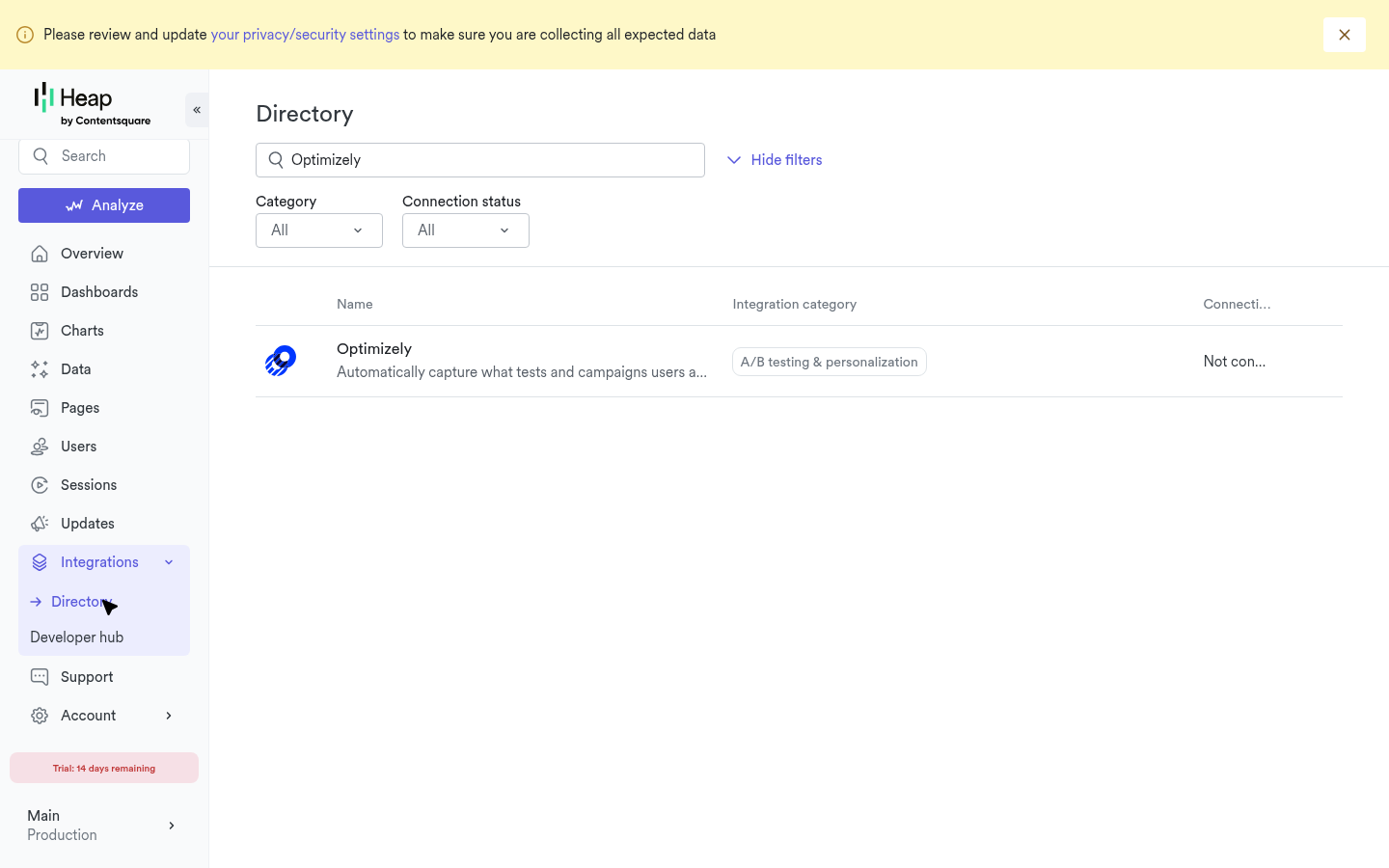
Heap maintains an official Optimizely X integration that, once enabled, automatically attaches active experiment variations to every Heap event captured on the page. This is documented in Heap → Optimizely X Integration. The integration is not on by default — it must be enabled in Heap's app under the Optimizely X Integration page (Settings → Integrations → Optimizely X → Connect). Once connected, Heap reads Optimizely's experiment state at pageview time and attaches it as a property to every event in that pageview.
How Autocapture Reads Optimizely Data
At pageview time, Heap reads the active experiment metadata from Optimizely's state object. For every active campaign the visitor is bucketed into, Heap attaches a pageview-level event property to all events on that page (including custom events). The property is set as a name/value pair, not a single concatenated string:
property name:  Optimizely: <Experiment Name>
property value: <Variation Name>
For example, if the visitor is in the "Checkout Redesign" experiment assigned to "Variation B", every Heap event on that pageview carries the property:
property name:  Optimizely: Checkout Redesign
property value: Variation B
Because Heap reads experiment state at pageview time, the property is fixed for the duration of that pageview. If the visitor is bucketed into a new experiment mid-pageview (rare in practice — Optimizely typically buckets at page load), Heap will not pick up the change until the next pageview fires. Single-page application teams should ensure that virtual pageviews are captured (via heap.track("Pageview") on route changes) so experiment metadata refreshes.
Enabling Autocapture
Enable the integration on Heap's side: in your Heap app, navigate to Settings → Integrations → Optimizely X (or search the integrations directory for "Optimizely") and click Connect. Once connected, all subsequent pageviews on pages with the Optimizely snippet present will carry experiment properties on every Heap event. Two extra preconditions to be aware of:
Optimizely tag must load synchronously and before Heap. Async tag managers (Google Tag Manager) break autocapture by deferring the Optimizely tag past pageview capture.
"Mask descriptive names" must be disabled in your Optimizely project. Optimizely → Settings → Privacy → uncheck
Mask descriptive names in project code and third-party integrations. With masking enabled, the names aren't available to the integration and no properties are sent.
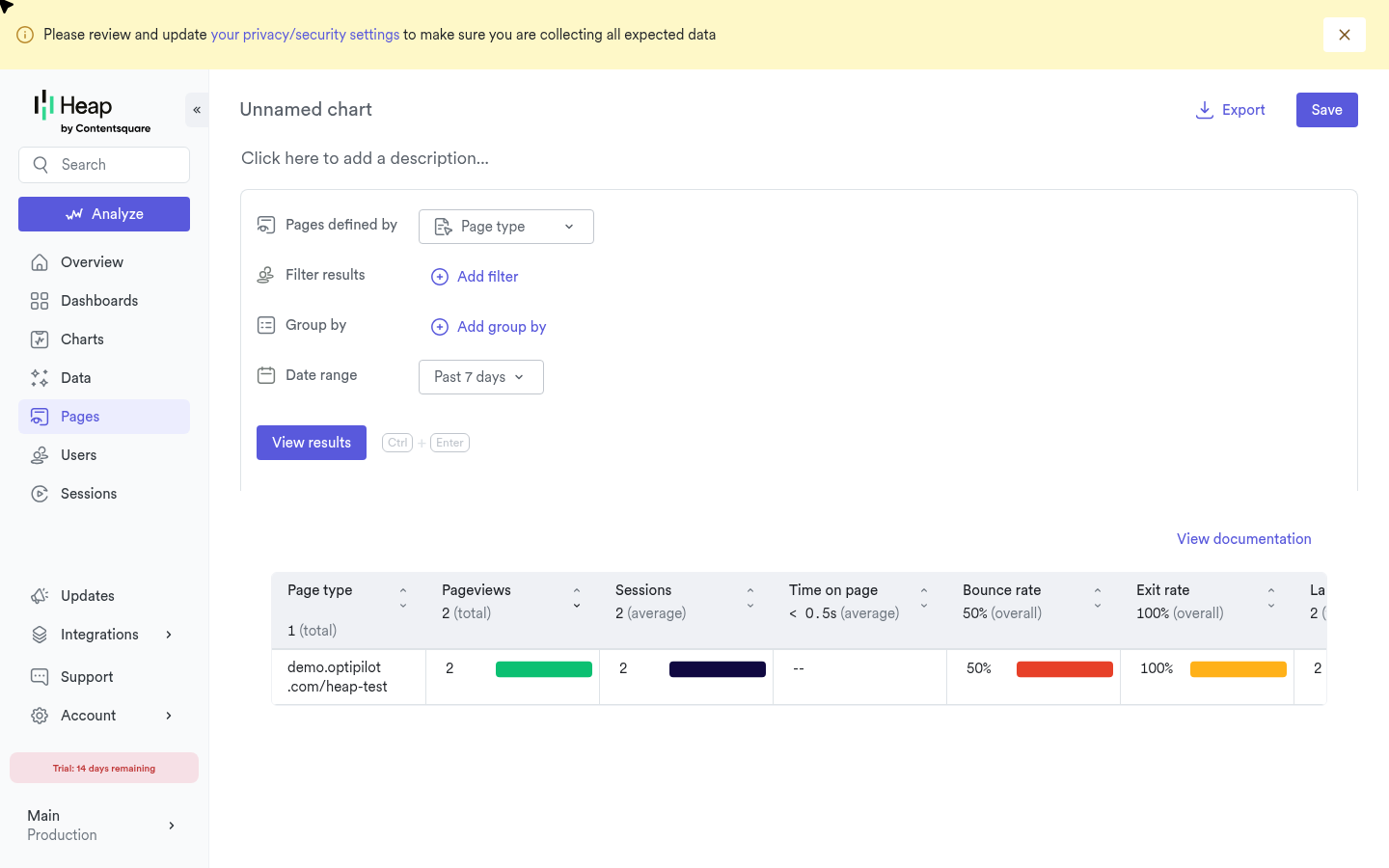
To verify it is active, open your Heap application and navigate to Live View while browsing a page with an active Optimizely experiment. Expand any captured event and look for a property prefixed with Optimizely:.
Limitations of Autocapture
Property format is fixed: property name is
Optimizely: <ExperimentName>and value is<VariationName>(a separate name/value pair, not a single concatenated string). The format cannot be customized.No explicit "Experiment Viewed" event. Autocapture attaches experiment data as properties on other events, not as a standalone event. Funnels cannot start from an experiment entry point without a separate event.
No user profile properties. Experiment data is applied only at the event level. It does not appear in Heap's user profile view under
addUserProperties(), so you cannot filter the Users panel by experiment participation.Holdback status is not captured. Visitors in the experiment holdback group are not differentiated from visitors outside the experiment entirely.
Only active campaigns at pageview time. Heap reads Optimizely's experiment state when the pageview is captured, not on every subsequent event. If an experiment completes or is paused after the pageview, events later in the same pageview will continue to carry the now-stale property; events on the next pageview will not carry it. In single-page applications, ensure virtual pageviews are tracked so the experiment state refreshes.
If any of these limitations affect your analysis workflow, use the custom JSON integration described in Method 2.
Method 2: Custom JSON Integration
The custom JSON integration gives you full control over how experiment data is structured and stored in Heap. This approach uses Optimizely's Custom Analytics Integration (JSON plugin) with the track_layer_decision callback to call the Heap SDK directly at decision time.
Warning: Do not enable both the autocapture integration and the custom JSON integration simultaneously. The autocapture method attaches Optimizely properties to every Heap event automatically. If the custom JSON integration also calls
heap.addEventProperties(), the result is duplicate experiment properties on every event — one in theOptimizely:format and one in your custom format.
Creating the JSON Integration
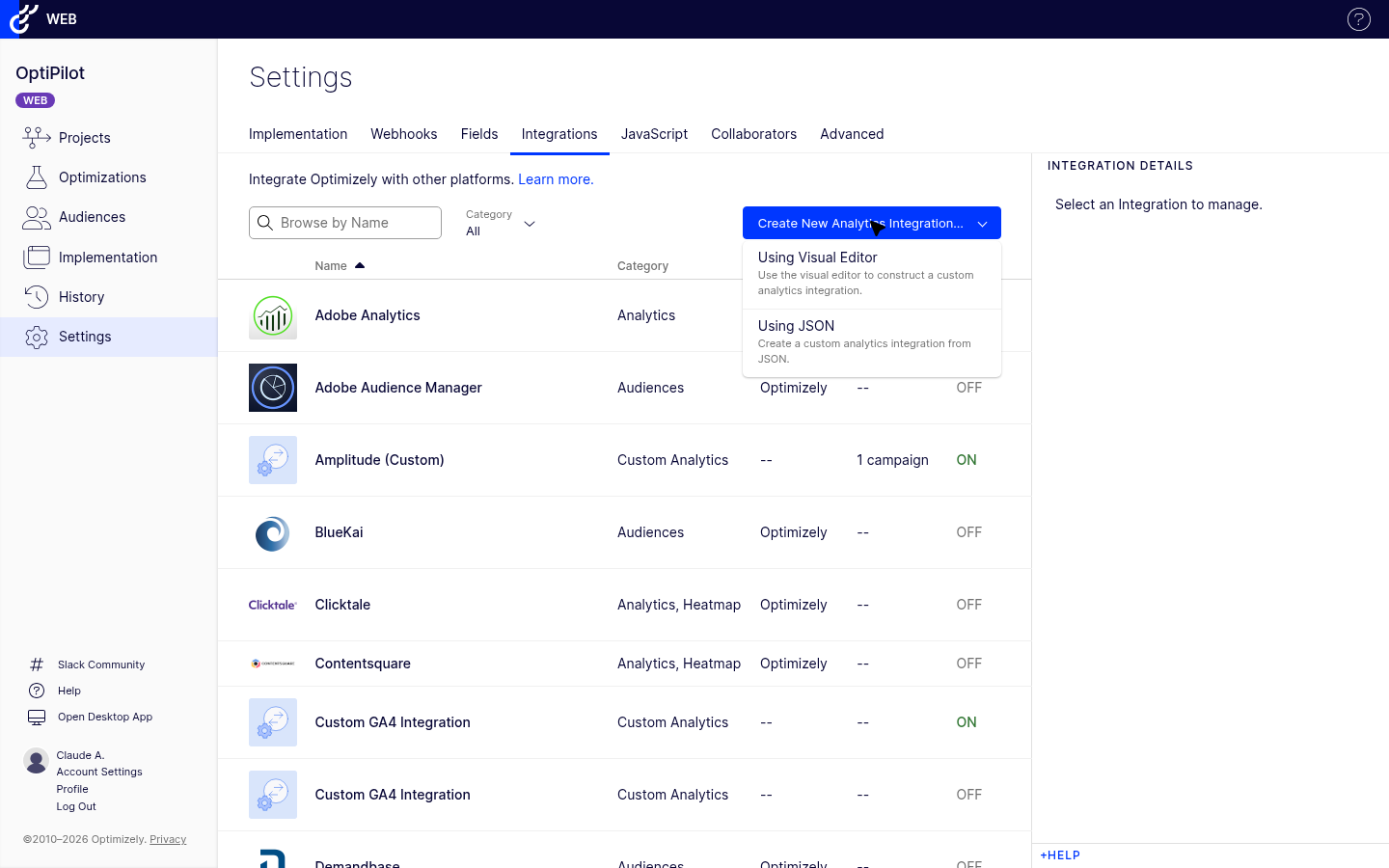
In your Optimizely project, go to Settings > Integrations.
Click Create Analytics Integration > Using JSON.
Paste the following configuration:
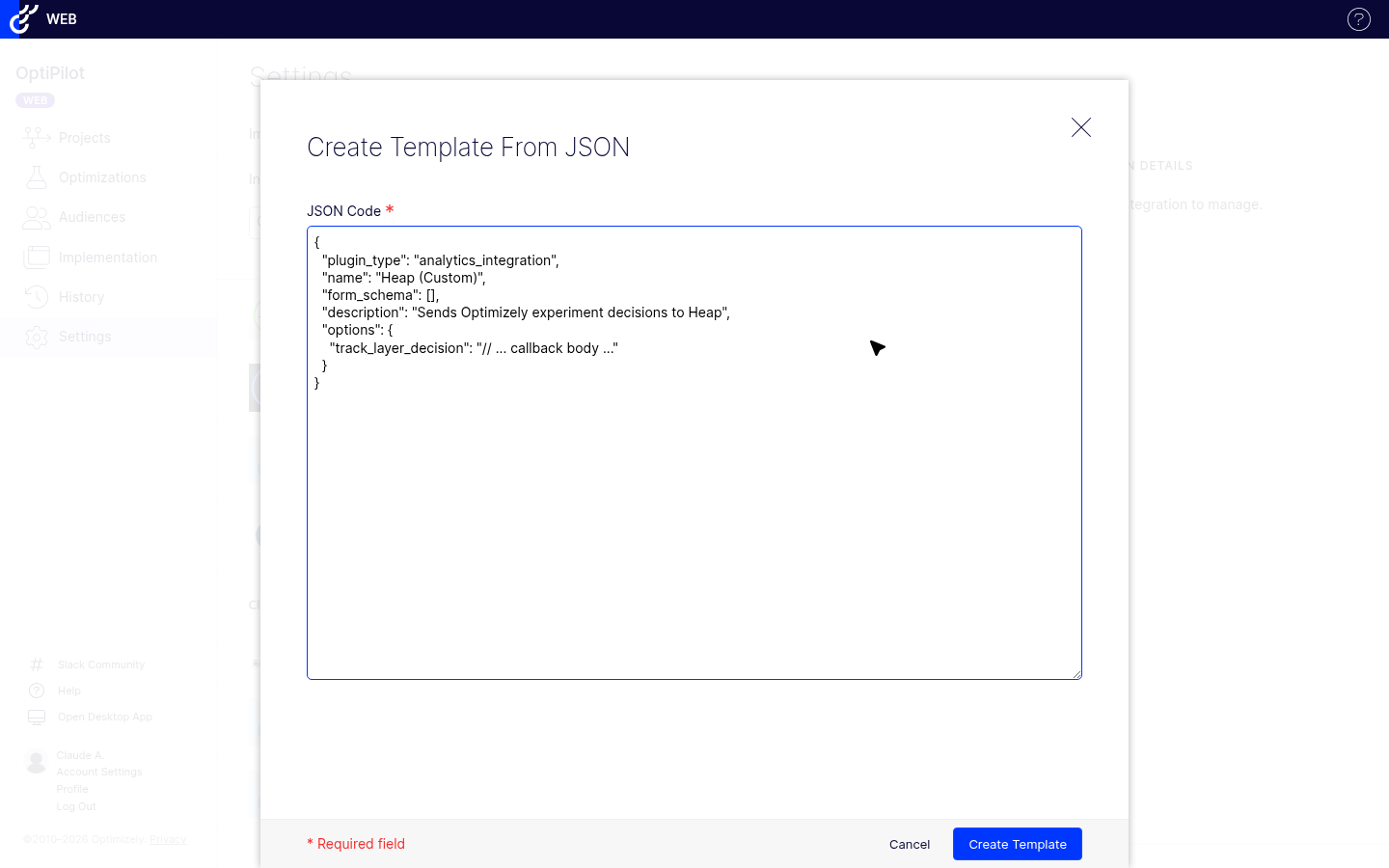
{
  "plugin_type": "analytics_integration",
  "name": "Heap (Custom)",
  "form_schema": [],
  "description": "Sends Optimizely experiment decisions to Heap as event properties, user profile properties, and a discrete Experiment Viewed event",
  "options": {
    "track_layer_decision": "var state = window['optimizely'].get('state');\nvar decisionObj = null;\nvar expName = String(campaignId);\nvar varName = String(variationId);\n\nif (state) {\n  try {\n    decisionObj = state.getDecisionObject({ campaignId: campaignId });\n    if (decisionObj) {\n      expName = decisionObj.experiment || expName;\n      varName = decisionObj.variation || varName;\n    }\n  } catch (e) {}\n}\n\nvar propertyKey = '[Optimizely] ' + expName;\nvar propertyValue = isHoldback ? 'holdback' : varName;\n\nvar utils = window['optimizely'].get('utils');\nutils.waitUntil(function() {\n  return typeof window.heap !== 'undefined' && typeof window.heap.track === 'function';\n}).then(function() {\n  var eventProps = {};\n  eventProps[propertyKey] = propertyValue;\n  window.heap.addEventProperties(eventProps);\n\n  var userProps = {};\n  userProps[propertyKey] = propertyValue;\n  window.heap.addUserProperties(userProps);\n\n  window.heap.track('Experiment Viewed', {\n    campaign_id: String(campaignId),\n    experiment_id: String(experimentId),\n    experiment_name: expName,\n    variation_id: String(variationId),\n    variation_name: propertyValue,\n    is_holdback: isHoldback\n  });\n});\n"
  }
}
Click Save Integration.
Toggle the integration to Enabled in Settings > Integrations.
Optionally check Enable for all new experiments to apply automatically to future experiments.
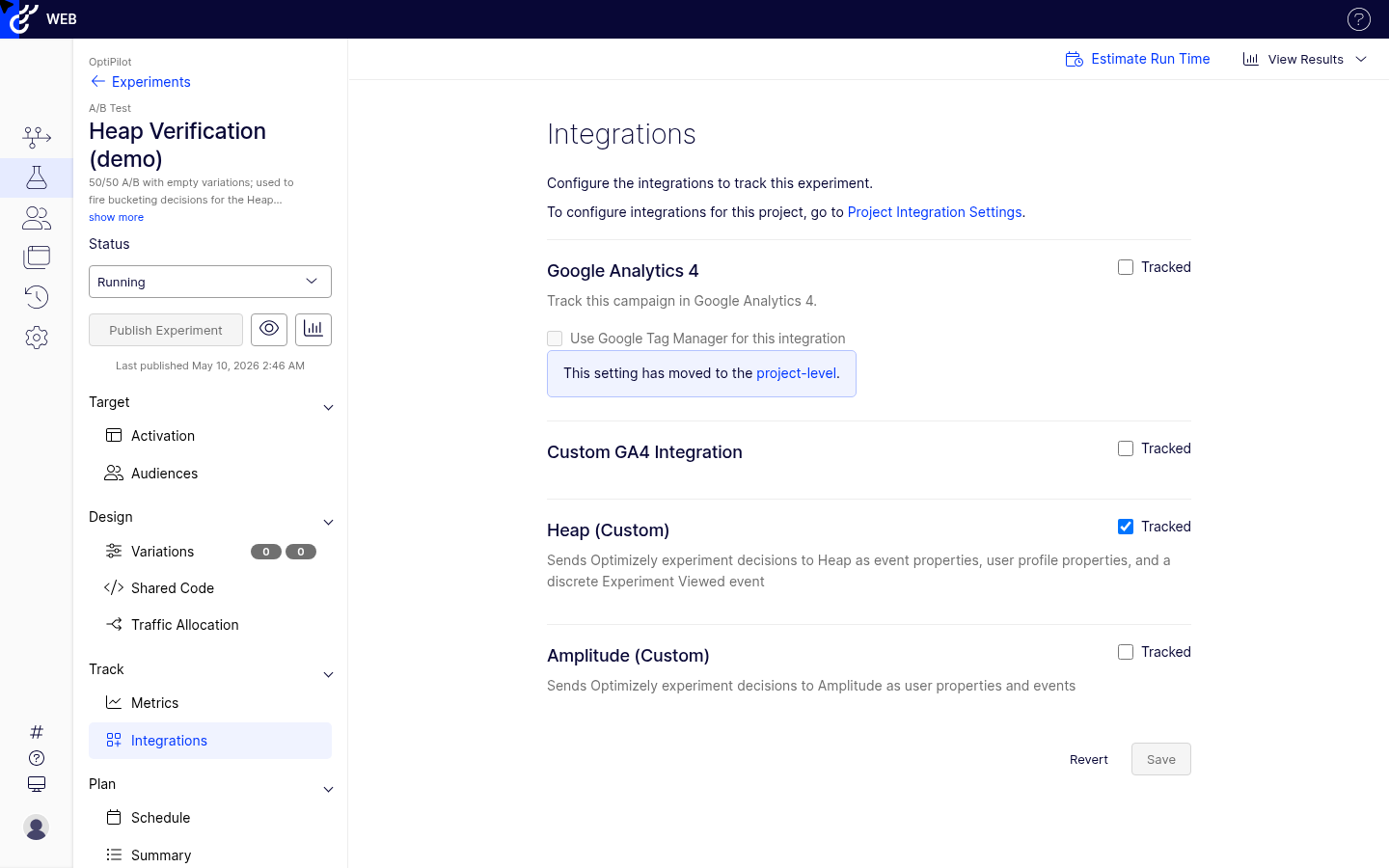
For existing experiments, go to each experiment's Manage Campaign > Integrations tab and enable the "Heap (Custom)" integration.
What the Callback Does
The options.track_layer_decision callback fires each time Optimizely makes a bucketing decision. Here is a breakdown of the logic:
Retrieving human-readable names: state.getDecisionObject({ campaignId }) looks up experiment and variation names from Optimizely's state API. If the state API is unavailable or Mask descriptive names is enabled in the project settings, the callback falls back to numeric IDs.
var state = window.optimizely.get('state');
var decisionObj = null;
var expName = String(campaignId);
var varName = String(variationId);

if (state) {
  try {
    decisionObj = state.getDecisionObject({ campaignId: campaignId });
    if (decisionObj) {
      expName = decisionObj.experiment || expName;
      varName = decisionObj.variation || varName;
    }
  } catch (e) {}
}
Waiting for Heap to be ready: The callback uses optimizely.get('utils').waitUntil() to defer execution until window.heap.track is available. This handles cases where Heap loads asynchronously after the Optimizely snippet — the decision data is held until Heap initializes, then sent.
var utils = window['optimizely'].get('utils');
utils.waitUntil(function() {
  return typeof window.heap !== 'undefined' && typeof window.heap.track === 'function';
}).then(function() {
  // Heap API calls run here once Heap is ready
});
Setting event super properties: heap.addEventProperties() attaches the experiment context to every event Heap captures for the remainder of the session. The property is keyed as [Optimizely] ExperimentName with the variation name (or "holdback") as the value.
var propertyKey = '[Optimizely] ' + expName;
var propertyValue = isHoldback ? 'holdback' : varName;

var eventProps = {};
eventProps[propertyKey] = propertyValue;
window.heap.addEventProperties(eventProps);
Setting user profile properties: heap.addUserProperties() persists the experiment context on the Heap user profile. Unlike event properties (session-scoped), user properties are permanent and visible in Heap's Users panel.
var userProps = {};
userProps[propertyKey] = propertyValue;
window.heap.addUserProperties(userProps);
Logging the event: heap.track() sends a discrete "Experiment Viewed" event with full campaign metadata. This event enables funnels that start at experiment entry, time-based analysis of experiment effects, and filtering analysis to a specific experiment without relying on property presence.
window.heap.track('Experiment Viewed', {
  campaign_id: String(campaignId),
  experiment_id: String(experimentId),
  experiment_name: expName,
  variation_id: String(variationId),
  variation_name: propertyValue,
  is_holdback: isHoldback
});
Verifying the Integration
After enabling either integration method, verify that data reaches Heap correctly before treating results as reliable.
Console Verification
Open your browser's developer console on a page with an active experiment:
// Check if Heap is loaded
console.log("Heap loaded:", typeof window.heap !== "undefined");

// Check Optimizely experiment state
var state = window.optimizely && window.optimizely.get("state");
if (state) {
  var campaigns = state.getCampaignStates({ isActive: true });
  for (var id in campaigns) {
    var c = campaigns[id];
    console.log("Campaign " + id + ":", {
      experimentId: c.experiment && c.experiment.id,
      variationId: c.variation && c.variation.id,
      isHoldback: c.isInCampaignHoldback
    });
  }
}

// For custom integration: verify addEventProperties was called
// (Heap does not expose a method to read current event properties,
// but you can verify by checking Live View in the Heap dashboard)
Heap Live View
In the Heap application, navigate to Live View.
Browse a page with an active experiment in a separate tab.
Watch for incoming events in Live View.
For the autocapture method: expand any captured event and look for a property starting with
Optimizely:.For the custom integration: look for an "Experiment Viewed" event and verify its properties include
experiment_name,variation_name, andcampaign_id.
Heap Users Panel
To verify user profile properties are being set (custom integration only):
Go to Users in Heap.
Find a user who visited a page with an active experiment during the verification session.
Expand their profile and look for a property named
[Optimizely] Your Experiment Name.Confirm the value matches the variation you were assigned.
Analyzing Experiments in Heap
Segments
Heap Segments let you define persistent user groups based on behavioral criteria. Create a segment for each variation to reuse across reports:
Go to Definitions > Segments > Create Segment.
Add a condition: users who performed "Experiment Viewed" where
experiment_nameequals your experiment name ANDvariation_nameequals "Variation A".Save as "Checkout Redesign — Variation A".
Repeat for the control variation.
Apply these segments across Funnels, Retention, and Journeys reports to compare behavior between groups without rebuilding filters each time.
Funnels
Funnels segmented by variation are the most direct way to measure experiment impact on conversion sequences:
Go to Analysis > Funnels > Create Funnel.
Define your funnel steps (e.g., Page View → Product Detail → Add to Cart → Purchase).
Apply your variation segment (or filter by the event property
[Optimizely] Your Experiment Name) to split the funnel by variation.Compare step-by-step conversion rates between control and treatment.
Because addEventProperties() attaches the experiment context to all subsequent events in the session, the variation property flows automatically through all funnel steps without additional tracking on downstream pages.
Journeys
Heap Journeys (formerly Paths) shows the sequence of actions users take within a session. Use it to understand whether a variation changes navigation behavior:
Go to Analysis > Journeys.
Set the starting event to "Experiment Viewed" filtered by your experiment name.
Filter by variation segment to compare paths taken by control versus treatment groups.
Look for differences in the frequency of specific paths, dead-end events, or exit points.
This analysis is particularly useful for multivariate tests or personalization campaigns where the impact on navigation is as important as direct conversion lift.
Retention
Retention analysis measures whether a variation produces a lasting change in engagement:
Go to Analysis > Retention.
Set the entry event to "Experiment Viewed" filtered by your experiment name.
Set the return event to your key engagement metric (e.g., returning visit, feature use, or purchase).
Apply your variation segments to the cohort breakdown.
Compare retention curves between control and treatment over the desired time window.
Heap Connect
Heap Connect is Heap's data warehouse export feature. It syncs all behavioral data — including experiment properties set by the integration — to Snowflake, BigQuery, Redshift, or Amazon S3. This is not a cohort sync; it is a full export of raw event data, user properties, and session data, enabling teams to run advanced experiment analysis in SQL.
When Heap Connect is configured, experiment data from the Optimizely integration appears as follows:
Event properties (
addEventProperties): included as columns on theall_eventstable, with the property key as the column name.User properties (
addUserProperties): included as columns on theuserstable."Experiment Viewed" events: appear as rows in
all_eventswithevent_type = 'custom'andevent_name = 'Experiment Viewed'.
A basic SQL query to compute conversion rates by variation in BigQuery looks like:
-- Heap Connect exposes event properties as DIRECT COLUMNS on the event table
-- (not as a JSON 'properties' field). Property names are sanitized to snake_case.
-- See: https://help.heap.io/hc/en-us/articles/37271938814481-Heap-Connect-Data-Schema

SELECT
  e.experiment_name AS variation_experiment,
  e.variation_name  AS variation,
  COUNT(DISTINCT e.user_id) AS users_entered,
  COUNT(DISTINCT p.user_id) AS users_converted,
  ROUND(COUNT(DISTINCT p.user_id) * 100.0 / NULLIF(COUNT(DISTINCT e.user_id), 0), 2) AS conversion_rate_pct
FROM main_production.experiment_viewed e
LEFT JOIN main_production.purchase p
  ON e.user_id = p.user_id
  AND p.time > e.time
WHERE e.experiment_name LIKE 'Checkout Redesign%'   -- entity ID is appended in parens by Optimizely
GROUP BY 1, 2
ORDER BY 1, 2;
Heap Connect is a paid add-on and is not included in Heap's standard plans. Contact Heap sales or check your contract to determine whether your plan includes warehouse export access.
Gotchas
Choose One Method — Not Both
Enabling the autocapture integration while also deploying the custom JSON integration causes duplicate experiment properties on every Heap event. The autocapture method adds Optimizely: [Experiment Name] = [Variation Name], and the custom integration adds [Optimizely] ExperimentName = VariationName — two different formats both attached to every event. This clutters your Heap event schema and makes analysis confusing. Pick one method and disable or do not configure the other.
addEventProperties Persists for the Session
Properties set via heap.addEventProperties() remain attached to all events for the duration of the browser session. If an experiment ends or the visitor is removed from targeting mid-session, the experiment property continues to appear on subsequent events. To clear it explicitly, call:
window.heap.removeEventProperty('[Optimizely] Your Experiment Name');
Consider calling this in any cleanup logic when an experiment is paused or concluded, particularly for long-running single-page applications where users may remain in a session for hours.
addUserProperties Uses Last-Write-Wins
If a visitor enters multiple experiments in sequence, each call to addUserProperties() with the same property key overwrites the previous value. Because the property key is [Optimizely] ExperimentName (which is experiment-specific), multiple concurrent experiments write to different keys and do not conflict. However, if a visitor is re-bucketed into the same experiment (e.g., after clearing cookies), the new variation value overwrites the previous one on the user profile. The event stream retains the full history.
Heap Event and Property Limits
Heap enforces the following limits on custom events and properties:
Event property key length: 512 characters maximum.
Event property value length: 1024 characters maximum.
Reserved event names: You cannot use
click,change,pageview, orsubmitas the event name inheap.track(). "Experiment Viewed" is safe to use.
Experiment and variation names that exceed 512 characters (rare in practice) will cause the property key to be silently dropped. If your experiment names are unusually long, consider truncating them in the callback before passing them to Heap.
Preview Mode Sends Real Data
When using Optimizely's Preview Mode to QA an experiment, the track_layer_decision callback fires normally. Decision events are sent to Heap and appear in your production Heap project's Live View and event stream. Use Heap's Live View to identify test sessions by their activity pattern, or use a separate Heap project for QA environments.
No Cohort Sync from Heap to Optimizely
Unlike Amplitude, which has a bidirectional cohort sync with Optimizely, Heap does not offer a native cohort export to Optimizely for experiment targeting. If you need to target experiments at Heap-defined behavioral segments, you would need to route that data through a customer data platform or implement custom audience targeting via the Optimizely REST API.
Troubleshooting
Event Properties Not Appearing in Heap
If events are appearing in Heap but the experiment property is missing:
Timing:
heap.addEventProperties()only affects events captured after the call. If Heap captures a page view or interaction event before the Optimizely decision fires, that event will not carry the experiment property.Autocapture method — Heap SDK version: Older Heap SDK versions may not support the Optimizely autocapture integration. Verify you are using a current Heap snippet from your Heap project settings.
Custom integration —
waitUntiltimeout: Ifwindow.heap.trackis not available within Optimizely'swaitUntiltimeout window, the callback exits without sending data. Check that the Heap snippet is present and loading correctly by inspectingwindow.heapin the console at page load.
"Experiment Viewed" Events Not Appearing
If no "Experiment Viewed" events appear in Heap (custom integration only):
Integration not enabled: Confirm the integration is toggled on in Settings > Integrations and enabled for the specific experiment in Manage Campaign > Integrations.
Visitor not bucketed: The callback fires only when Optimizely makes an active bucketing decision. If the visitor does not meet the experiment's audience conditions, no decision fires and no event is sent.
Heap not initialized: Verify
window.heapexists andwindow.heap.trackis a function in the browser console. If Heap fails to load (e.g., due to an ad blocker or script error),waitUntilwill wait indefinitely.Ad blockers: Privacy extensions commonly block requests to Heap's analytics domains. Check the network tab for blocked requests to
heapanalytics.com.
Autocapture Properties Not Appearing
If you are using the autocapture method and no Optimizely: properties appear on Heap events:
Confirm both the Heap snippet and Optimizely snippet are on the same page.
Verify
window.optimizelyexists in the console.Verify that
window.optimizely.get('state').getActiveCampaigns()returns at least one active campaign for the current visitor.Check the Heap SDK version — the Optimizely autocapture integration requires Heap's current JavaScript snippet. If you have an older snippet installed, regenerate it from Heap's settings.
Data Discrepancies Between Platforms
Differences between Optimizely visitor counts and Heap event counts are expected:
Counting unit: Optimizely counts unique visitors (cookie-based), while Heap uses its own identity model (anonymous ID, then identified user). Identity resolution differences cause count divergence.
Ad blockers: Ad blockers may selectively block Heap or Optimizely requests, skewing counts in either direction.
SPA navigation: In single-page applications, Optimizely may fire multiple decisions on client-side navigation while Heap tracks pageviews differently. Ensure your SPA tracking model is consistent.
Preview and QA sessions: If preview sessions are not filtered out, they inflate Optimizely decision counts relative to real Heap user counts.
Expect 5–15% discrepancy between Optimizely visitor counts and Heap event counts for the same experiment. Investigate further if differences exceed 20%.